AI Knows Everything — Except What's in Your Documents

Your documents stay on your device. Ask AI anything about your PDFs, Word docs, and EPUBs — with privacy built in.

Available on iPhone, iPad, and Android

1-week free trial included

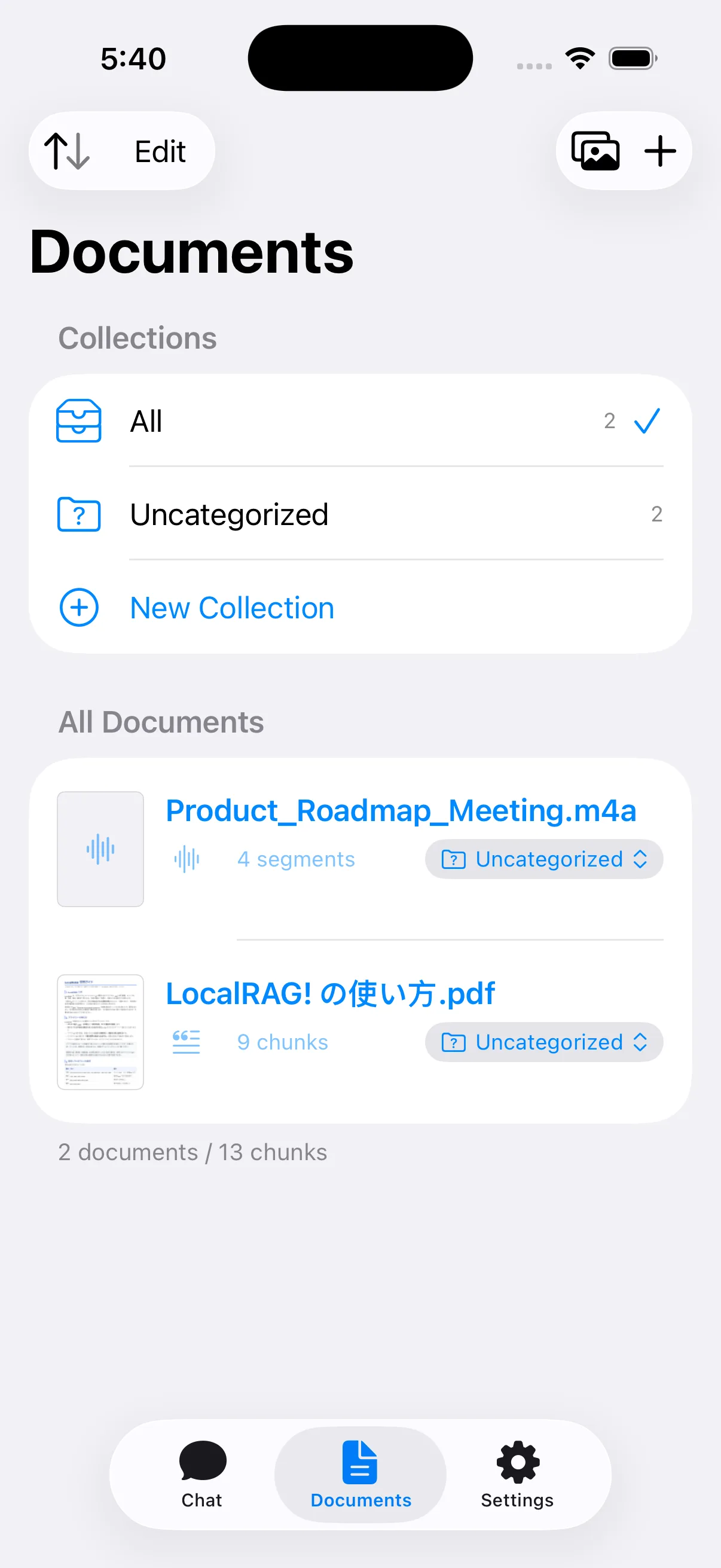
LocalRAG app screenshot

What's New

v1.22026-03-13

Image Support

Import photos of whiteboards, receipts, handwritten notes, and scanned documents. On-device OCR extracts text instantly — then ask AI anything about your images, just like any other document.

JPGPNGHEICWebP

Any file. One conversation.

PDF, Word, EPUB, whiteboard photos, scanned receipts — no matter the format, just add them to a collection. AI searches across all your documents at once.

All your project docs in one place

All your project docs in one place

Meeting PDFs, Word minutes, text memos — formats don't matter. Add them to a collection and ask "What was decided about that issue?" No more opening files one by one.

Bought books you haven't read? No problem

Bought books you haven't read? No problem

Import your unread PDFs and EPUBs together. Without reading a page, ask "What's the key point of this book?" or "Explain the method in Chapter 3." AI reads every page for you.

Search across multiple technical standards

Search across multiple technical standards

ISO PDFs, RFC text files, internal Word policies — load them all into one collection. Ask "What are the authentication requirements?" and LocalRAG finds relevant sections across every document.

Just add everything. Ask AI later.

Just add everything. Ask AI later.

Insurance policies, user manuals, contracts, recipes, whiteboard photos, scanned receipts. Add anything to a collection. You may forget what's in there, but LocalRAG never does. When you need it, just ask — it tells you which document has the answer.

What can you do with LocalRAG?

From quick PDF summaries to deep contract analysis.

See it in action

Watch how LocalRAG turns your documents into conversations.

Everything you need

Powerful document AI that respects your privacy.

📄

13 Formats Supported

PDF, EPUB, DOCX, TXT, MD, CSV, RTF, HTML, JPG, PNG, HEIC, WebP — plus scanned and copy-protected PDFs.

💬

Natural Language Chat

Ask questions about your documents in plain language. Get answers with source citations.

🔒

Privacy First

All document processing happens on your device. Your files never leave your phone or tablet.

🔍

Hybrid Search

Four-stage search pipeline ensures accurate context retrieval in any language.

🖼

Image OCR

Import photos of whiteboards, receipts, or scanned documents. On-device OCR extracts text for instant Q&A.

📂

Collections (Folders)

Organize documents in nested folders up to 3 levels. Parent scope includes all child documents for focused Q&A.

🤖

Model Selection

Choose Claude Haiku 4.5 for speed, Sonnet 4.5 for balance, or Opus 4 for maximum accuracy. Or bring your own API key.

How it works

Three simple steps to chat with your documents.

1

Import

Add documents from your file manager or other apps. 9 formats supported.

2

Index

LocalRAG extracts text and builds a search index — entirely on your device.

3

Ask

Ask anything about your documents. Get AI-powered answers with citations.

Supported formats

All the document types you work with, in one app.

PDFEPUBDOCXTXTMDCSVRTFHTMLJPG/PNGHEIC/WebPScanned PDF

Frequently Asked Questions

Is LocalRAG truly local? What data is sent to the cloud?

Document processing — text extraction, chunking, and search indexing — happens entirely on your device. Your files are never uploaded anywhere. When you use Claude, only your question and the top 10 most relevant text snippets (~500 characters each) are sent to the Claude API. The full document is never transmitted.

How is this different from ChatPDF, PDF.ai, or other cloud-based tools?

Cloud-based services require you to upload your entire document to their servers. LocalRAG keeps your files on your device and only sends small, relevant excerpts when you ask a question. This makes it suitable for sensitive documents like contracts, medical records, or confidential research.

Does Anthropic use my data for AI training?

No. Anthropic's API usage policy explicitly states that API inputs and outputs are not used for model training. This is different from the free consumer Claude chat product. Your document excerpts are processed and discarded.

Can I use LocalRAG without a subscription?

Yes. The free plan includes 5 questions per day with Claude Haiku. You can also bring your own Anthropic API key (BYOK) for unlimited access to all models at no subscription cost — you only pay Anthropic directly for API usage.

What document formats are supported?

LocalRAG supports 13 formats: PDF, EPUB, DOCX, TXT, Markdown, CSV, RTF, HTML, JPG, PNG, HEIC, and WebP. Scanned and copy-protected PDFs are also supported via on-device OCR. Images are processed using on-device OCR to extract text.

Start chatting with your documents

Start free with 5 questions/day, or subscribe for more.
Free, Standard ($4.99/mo), and Pro ($9.99/mo) plans available. Cancel anytime.
Terms of Use · Privacy Policy